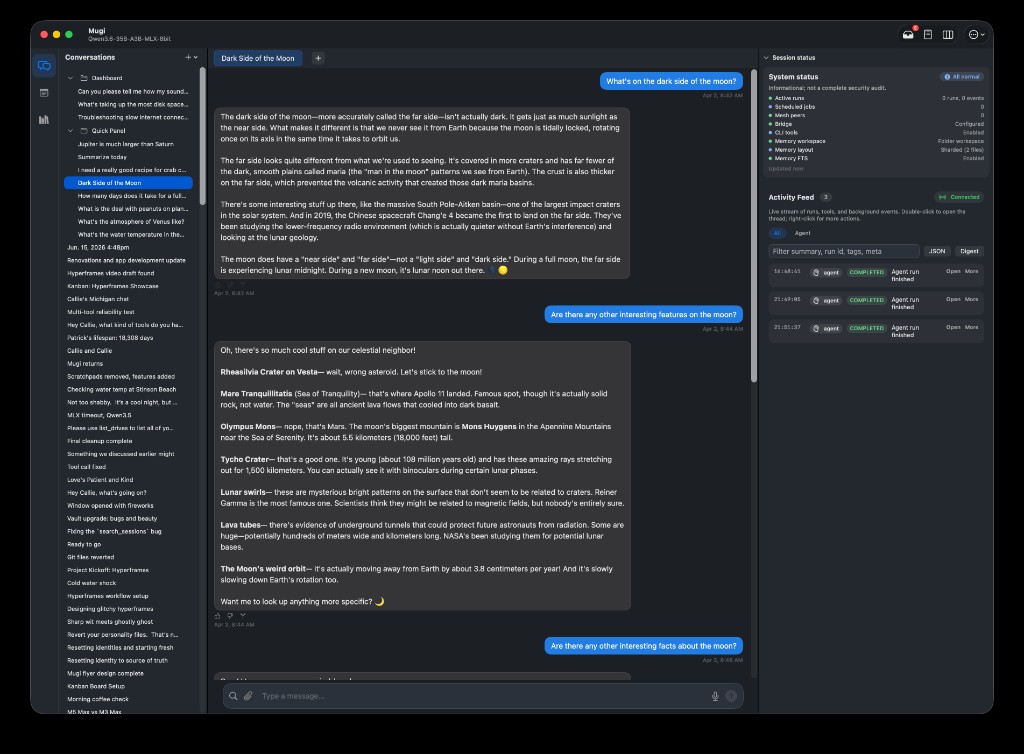
Open-source models on your Mac — searches the web, reads and writes files, runs tools, and delegates real work to background workers.
A native Mac app: chat, notes, Settings, and a first-run wizard — not something you assemble from the command line. Your mother could use it; power users still get Kanban, Vault, and every toggle in Settings.
Private by default — no telemetry, no cloud account. Everything stays on disk under your control.
Swap in any model you like — we recommend a few that work great out of the box, but you're not locked in.*
Mugi runs entirely on your Mac — MLX inference, your workspace, your files. It looks and behaves like the Mac apps you already use: a main window with conversations, an Activity feed, Preferences panes, and voice input — not a developer tool disguised as chat.
Every conversation, note, and memory file lives on disk you control. Nothing is uploaded. Nothing is collected. You review, edit, export, or delete on your terms.
It maintains a working model of you (goals, commitments, recurring threads) and uses it to surface useful background work — always as reviewable proposals or Kanban tasks that wait for your go-ahead.
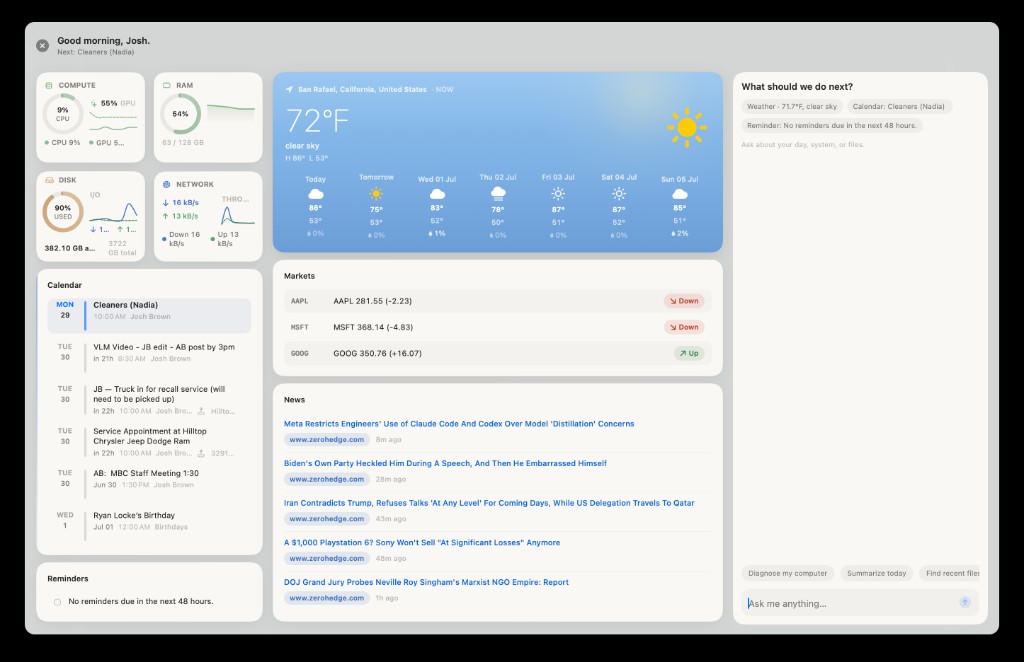
Press ⇧⌥D from anywhere — a floating panel with live vitals, your calendar, weather, markets, news, and a dedicated agent chat that already knows what’s on screen.
View → Dashboard in the menu · Esc to dismiss · Same privacy as the rest of Mugi — all local.
Under the friendly UI, a real agent loop: the model calls tools, Mugi runs them on your Mac, feeds results back, and keeps going until the job lands — or it needs you.
Read, write, patch, search, and organize files in your workspace — plus git status and commits when you need them.
Local search, page capture, deep multi-source research — Research mode spins a background worker so long investigations don’t block chat.
Extract text from PDFs, OCR scans and photos, split and merge documents — without leaving the app.
In-thread task plans, durable Kanban workers, Results deliverables — serious multi-step work, not just chat replies.
Persistent memory, a dedicated Vault notebook with hybrid search, and a Knowledge Library you browse, read, and graph — with citations when Mugi draws on what you’ve studied.
Global Dashboard (⇧⌥D) with vitals, calendar, weather, and news; Spotlight search and host diagnostics — optional shell when you explicitly allow it.
Voice input, text-to-speech, and Full Duplex voice (beta) — talk to Mugi like any other Mac app with a mic button.
Skills, plugins, and MCP servers add more tools without rebuilding the app — power without turning it into a dev project.
Risky bits (shell, web automation, background autonomy) stay behind explicit Settings toggles and your approval.
Consent-first memory and background work — the parts that make Mugi more than a chat window.
Mugi builds a working model of your projects, preferences, and commitments — stored locally, never uploaded. Background processes extract signals from conversations and notes; they surface as reviewable proposals in the You pane or concrete tasks in Kanban, always waiting for your approval.
Vault now has its own front door in the sidebar: write, organize, and find notes without triage-inbox chrome in the way. Hybrid search (full-text + semantic recall), a related-note inspector, wikilinks, and a recently-deleted list — still encrypted at rest, still on your Mac.
Feed Mugi folders, documents, codebases, or research collections. The Library is now one continuous workspace — search, reader, inspector, and graph — instead of a pile of subsystem tabs. Source repair, corpus rename, and clearer ingest status landed in 0.11.0.
0.11.0 is a big step for the surfaces people live in daily: Vault as its own notebook, Knowledge as a proper library, and a completed kernel cutover so chat and workers share one reliable stack. We’re still in public preview — but the direction is clearer and the rough edges are fewer.
See Settings → Knowledge and the in-app Library for corpus admin, progress, and search.
Not a finished product. A serious attempt at something new, released so real people can tell us if the direction is worth pursuing.
Drag to Applications, run the setup wizard, and start talking. A signed, notarized Mac app with Sparkle updates — local models, local data, your control.
A proper user manual written for everyday people (with power-user sections) is already available, including dedicated coverage of the Vault and Knowledge Base.